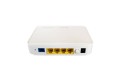
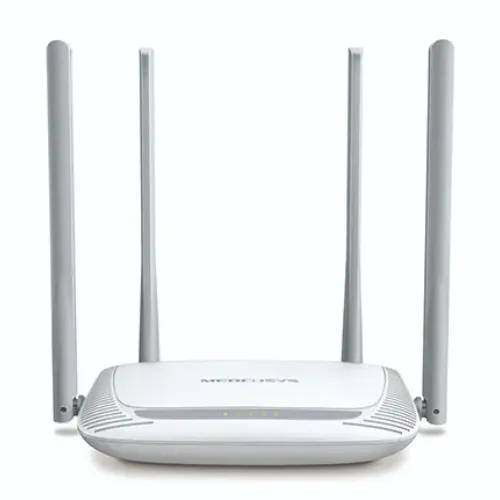
Overview of Mercusys MW325R 300Mbps WiFi Router
The Mercusys MW325R is a 300Mbps Wireless N router designed to provide reliable wireless connectivity for homes, apartments and small offices. It operates on the 2.4GHz band and supports IEEE 802.11b/g/n wireless standards with wireless speeds of up to 300Mbps.
The MW325R combines 2×2 MIMO technology with four 5dBi high-gain fixed antennas to improve wireless coverage and signal stability. Mercusys positions the router for applications such as HD streaming, online gaming, large file downloads and general everyday internet access. :contentReference[oaicite:1]{index=1}
The current MW325R V3 hardware provides 1 × 10/100Mbps WAN port and 3 × 10/100Mbps LAN ports, while supporting Router, Range Extender, Access Point and WISP modes. :contentReference[oaicite:2]{index=2}
Why Choose the Mercusys MW325R?
- 300Mbps Wireless N speed.
- 2.4GHz Wi-Fi connectivity.
- Four high-gain 5dBi antennas.
- 2×2 MIMO technology.
- Simple web-based installation.
- Router, Range Extender and AP functionality.
- WISP mode for wireless ISP connections.
- WPA/WPA2 wireless security.
- Guest network support.
- Suitable for homes and small offices.
Technical Specifications
| Feature |
Specification |
| Brand |
Mercusys |
| Model |
MW325R |
| Product Type |
300Mbps Enhanced Wireless N Router |
| Wi-Fi Class |
N300 |
| Wireless Speed |
Up to 300Mbps |
| Wireless Frequency |
2.4GHz |
| Wireless Standards |
IEEE 802.11b/g/n |
| MIMO |
2×2 MIMO |
| Antennas |
4 × 5dBi Fixed Omni-Directional Antennas |
| WAN Port |
1 × 10/100Mbps |
| LAN Ports |
3 × 10/100Mbps |
| WAN Types |
Dynamic IP, Static IP, PPPoE, L2TP, PPTP |
| Operating Modes |
Router, Range Extender, Access Point, WISP |
| Wireless Security |
WPA-PSK / WPA2-PSK |
| Guest Network |
2.4GHz Guest Network |
| DHCP |
DHCP Server / DHCP Client List |
| Port Forwarding |
Virtual Server, UPnP, DMZ |
| Dynamic DNS |
Oray |
| Firewall Security |
IP and MAC Address Binding |
| Wireless Functions |
Wireless Radio Enable/Disable, WPS, AP Isolation |
| Management |
Local Management, Remote Management, Access Control |
| Protocols |
IPv4 / IPv6* |
| Dimensions |
167 × 118 × 33mm |
| Power Supply |
5V DC / 0.6A (V3) |
| Installation |
Desktop / Wall Mount |
| Operating Temperature |
0°C to 40°C |
| Operating Humidity |
10% to 90%, Non-Condensing |
| Certifications |
CE, RoHS |
*Specifications can vary by hardware revision. The current V3 specification lists IPv4 and IPv6 support, while older V1/V2 documentation has some differences. Confirm the hardware version before publishing revision-specific specifications. :contentReference[oaicite:3]{index=3}
300Mbps Wireless N Connectivity
The MW325R provides wireless speeds of up to 300Mbps on the 2.4GHz band. It uses IEEE 802.11b/g/n standards and is designed for everyday internet activities such as web browsing, video streaming, online gaming and file downloads.
The advertised 300Mbps represents the maximum theoretical wireless link rate; actual internet and file-transfer speeds vary depending on ISP service, client device, distance, interference and network conditions. :contentReference[oaicite:4]{index=4}
Four 5dBi High-Gain Antennas
One of the key features of the MW325R is its four fixed 5dBi omni-directional antennas. Mercusys combines these antennas with 2×2 MIMO technology to improve wireless signal transmission and reception.
Mercusys describes the MW325R as providing broad wireless coverage, although actual coverage depends on walls, interference, device placement and the surrounding RF environment. :contentReference[oaicite:5]{index=5}
2×2 MIMO Technology
The router uses 2×2 MIMO technology to improve wireless communication efficiency. Multiple spatial streams can help compatible devices maintain better wireless performance compared with basic single-stream wireless configurations.
Router Mode
In standard Router Mode, the MW325R connects to an internet service through its WAN port and creates a local wireless and wired network for connected devices.
It supports common WAN connection types including Dynamic IP, Static IP and PPPoE, with L2TP and PPTP also listed in current V3 documentation. :contentReference[oaicite:6]{index=6}
Range Extender Mode
The MW325R can operate as a Range Extender, allowing it to extend an existing Wi-Fi network into areas where the primary wireless router's signal is weaker.
This mode can be useful for larger homes, multi-room environments and locations where running Ethernet cable to the additional coverage area is inconvenient.
Access Point Mode
In Access Point Mode, the MW325R can turn an existing wired network connection into a wireless network. This is useful when a main router or network switch already provides routing but additional Wi-Fi coverage is required.
WISP Mode
The router also supports WISP Mode, which allows it to connect wirelessly to an ISP or upstream wireless network and share that connection with local devices. This can be useful in locations where conventional wired broadband is not directly available. :contentReference[oaicite:7]{index=7}
Guest Network
The MW325R supports a 2.4GHz guest network. A guest SSID allows visitors to access the internet without necessarily providing them with access to the primary local network.
Wireless Security
Wireless security includes WPA-PSK and WPA2-PSK. The router also provides functions such as wireless radio control, WPS and AP isolation depending on hardware and firmware version. :contentReference[oaicite:8]{index=8}
Parental & Access Control Features
Depending on the hardware revision and firmware, the MW325R provides access-control features that allow administrators to manage connected devices and control network access.
Mercusys documentation for the MW325R family also lists functions such as local management, remote management and access control. :contentReference[oaicite:9]{index=9}
10/100Mbps Wired Connectivity
The current V3 model includes one 10/100Mbps WAN port and three 10/100Mbps LAN ports. This provides wired connectivity for computers, smart TVs, IP cameras, printers, switches and other Ethernet devices.
Because the Ethernet interfaces are Fast Ethernet rather than Gigabit Ethernet, the MW325R is best suited to internet packages and local-network requirements that do not require Gigabit wired connectivity. :contentReference[oaicite:10]{index=10}
Easy Installation
The MW325R is designed for straightforward setup. Mercusys describes a simple web-based installation process where users can create an administrator password, select their internet connection type and configure the wireless SSID and password. :contentReference[oaicite:11]{index=11}
Compact Desktop Design
The router measures approximately 167 × 118 × 33mm, making it compact enough for desktop placement in homes and small offices. The current V3 model supports both desktop and wall-mount installation. :contentReference[oaicite:12]{index=12}
Applications of Mercusys MW325R
- Home Wi-Fi Networks
- Small Office Networks
- Apartment Internet Sharing
- Basic Broadband Connectivity
- Wi-Fi Range Extension
- Access Point Deployment
- WISP Wireless Internet Access
- Guest Wi-Fi Networks
- Basic ISP Customer Premises Networks
Ideal for Home & Small Office Users
The MW325R is aimed at users who need an affordable wireless router for everyday connectivity rather than advanced enterprise networking. Its 300Mbps 2.4GHz wireless capability, four 5dBi antennas and multiple operating modes make it suitable for typical home and small-office deployments.
Benefits of Using the Mercusys MW325R
- Up to 300Mbps wireless speed.
- Four 5dBi high-gain antennas.
- 2×2 MIMO technology.
- 2.4GHz Wireless N connectivity.
- Range Extender functionality.
- Access Point functionality.
- WISP mode.
- Guest network support.
- WPA/WPA2 wireless security.
- Simple web-based installation.
- Compact design.
- Suitable for homes and small offices.
Mercusys MW325R Price in Bangladesh
The current Bangladesh retail listing I found shows the Mercusys MW325R at ৳1,349, with a regular price of ৳1,419 at the time checked. Price and stock can change, so the current selling price should be confirmed before publication. :contentReference[oaicite:13]{index=13}
Buy Mercusys MW325R 300Mbps WiFi Router in Bangladesh
If you're looking for the Mercusys MW325R 300Mbps WiFi Router in Bangladesh, it is a practical choice for basic home and small-office wireless networking.
With 300Mbps 2.4GHz Wireless N, four 5dBi antennas, 2×2 MIMO, three LAN ports, a WAN port and multiple operating modes, the MW325R provides the essential features needed for everyday broadband connectivity. :contentReference[oaicite:14]{index=14}
Hardware Version Note
The MW325R has been released in multiple hardware revisions, including V1, V2 and V3. Some specifications differ between revisions—for example, the current V3 documentation lists three 10/100Mbps LAN ports and one WAN port, while some older V1 documentation lists four LAN ports plus one WAN port. Therefore, the exact hardware version should be checked when ordering or publishing a detailed specification table. :contentReference[oaicite:15]{index=15}
Why Buy from Independent Tech BD?
- Genuine Networking Products
- Competitive Price in Bangladesh
- Home & Small Business Networking Solutions
- Corporate & Project Supply
- Technical Support for Network Deployment
- Nationwide Delivery
- Reliable After-Sales Service
Frequently Asked Questions (FAQ)
What is the speed of the Mercusys MW325R?
The MW325R supports up to 300Mbps wireless speed on the 2.4GHz band. :contentReference[oaicite:16]{index=16}
Does the MW325R support 5GHz Wi-Fi?
No. The MW325R is a 2.4GHz-only Wireless N router supporting IEEE 802.11b/g/n. :contentReference[oaicite:17]{index=17}
How many antennas does it have?
It has four fixed 5dBi omni-directional antennas. :contentReference[oaicite:18]{index=18}
Does the MW325R have Gigabit ports?
No. The current V3 model uses 10/100Mbps Fast Ethernet for both WAN and LAN connections. :contentReference[oaicite:19]{index=19}
Can the MW325R work as a Wi-Fi extender?
Yes. The current MW325R supports Range Extender Mode. :contentReference[oaicite:20]{index=20}
Can it work as an Access Point?
Yes. It supports Access Point Mode, allowing an existing wired network to be extended with Wi-Fi. :contentReference[oaicite:21]{index=21}
Does it support WISP?
Yes. The MW325R supports WISP Mode for connecting to an upstream wireless ISP/network. :contentReference[oaicite:22]{index=22}
Does it support a guest network?
Yes. The MW325R provides a 2.4GHz guest network. :contentReference[oaicite:23]{index=23}
What is the difference between MW325R V2 and V3?
Both are 300Mbps Wireless N routers, but hardware and software specifications differ. For example, the V3 documentation lists 3 × 10/100Mbps LAN + 1 × 10/100Mbps WAN, while older V2 documentation lists the same 3-LAN configuration but has differences in features and power specifications. Always verify the hardware revision supplied. :contentReference[oaicite:24]{index=24}

-500x500.jpg "Mercusys MW325R 300Mbps Wifi Router")
-500x500.jpg "Mercusys MW325R 300Mbps Wifi Router")

-80x80.jpg "Mercusys MW325R 300Mbps Wifi Router")
-80x80.jpg "Mercusys MW325R 300Mbps Wifi Router")
-120x80h.jpg "Mercusys AC12 AC1200 Dual Band WiFi Router")

-120x80h.png "Mercusys Halo H50G AC1900 Dual Band Gigabit Mesh Router (3 Pack)")
-120x80h.jpg "Mercusys MR20 AC750 Dual-Band WiFi Router")