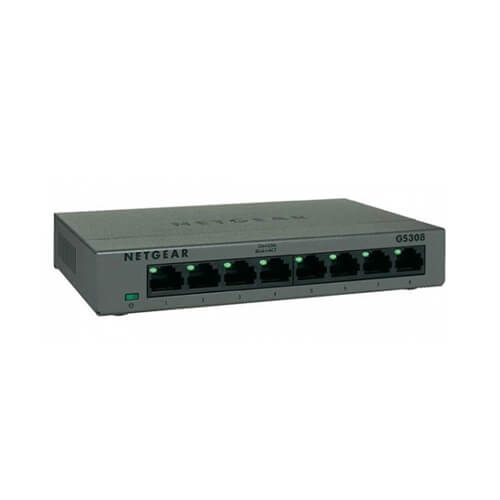
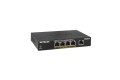
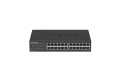
Overview of NETGEAR GS308 8-Port Gigabit Switch
The NETGEAR GS308 is an 8-port Gigabit Ethernet unmanaged desktop switch designed to provide simple and reliable wired network connectivity for homes, offices, small businesses, and other network environments. It provides eight Ethernet ports for connecting computers, printers, IP cameras, access points, servers, and other network-enabled devices.
With Gigabit Ethernet connectivity, the GS308 provides a convenient way to expand an existing wired network without requiring complex configuration or network management. As an unmanaged switch, it is designed for plug-and-play operation, making it suitable for users who need straightforward Ethernet connectivity.
The compact desktop form factor makes the NETGEAR GS308 suitable for placement on desks, shelves, network cabinets, reception areas, classrooms, small offices, and other locations where additional Ethernet ports are required.
Key Features
- 8 Gigabit Ethernet Ports: Provides eight Ethernet ports for connecting multiple wired network devices.
- Gigabit Speed: Supports high-speed Gigabit Ethernet connectivity for compatible devices.
- Unmanaged Operation: Designed for simple plug-and-play networking without requiring advanced configuration.
- Auto-Negotiation: Automatically detects compatible network speeds and connection characteristics.
- Auto MDI/MDIX: Simplifies network connections by automatically detecting the required cable configuration.
- Desktop Design: Compact form factor suitable for desks, shelves, offices, and small network installations.
- Energy-Efficient Networking: Designed to help reduce unnecessary power consumption during normal network operation.
- Versatile Connectivity: Suitable for computers, printers, IP cameras, wireless access points, NAS devices, and other Ethernet equipment.
Technical Specifications
| Specification |
Details |
| Brand |
NETGEAR |
| Model |
GS308 |
| Product Type |
Unmanaged Gigabit Ethernet Switch |
| Port Capacity |
8 Ports |
| Port Type |
RJ45 Ethernet |
| Network Speed |
10/100/1000 Mbps |
| Switch Type |
Unmanaged |
| Management |
Plug-and-Play / Unmanaged |
| Auto-Negotiation |
Yes |
| Auto MDI/MDIX |
Yes |
| Installation |
Desktop |
| Application |
Wired Ethernet Networking |
8-Port Gigabit Ethernet Switch
The NETGEAR GS308 provides eight Gigabit Ethernet ports, allowing multiple wired devices to communicate over an Ethernet network.
It can be used to expand the number of available Ethernet connections from an existing router, switch, or other network infrastructure. Devices connected to the switch can communicate with other devices on the same network according to the network configuration.
Gigabit Ethernet Connectivity
Each port supports 10/100/1000 Mbps Ethernet, allowing compatible devices to establish Gigabit Ethernet connections.
Gigabit Ethernet is suitable for applications such as file transfers, network storage, video streaming, IP surveillance, office networking, and general high-speed LAN connectivity.
Unmanaged Plug-and-Play Operation
The GS308 is an unmanaged switch, meaning it does not require a web interface or advanced network configuration for normal operation.
Simply connect Ethernet cables between the switch and compatible network devices, power on the switch, and it can begin forwarding network traffic automatically.
This makes the GS308 suitable for users who want to expand a network without configuring VLANs, routing, or other advanced managed-switch features.
Auto-Negotiation
The switch supports automatic negotiation of network connection parameters. It can automatically detect the supported Ethernet speed of connected devices and establish the appropriate connection.
This helps simplify deployment when devices with different Ethernet capabilities are connected to the switch.
Auto MDI/MDIX
The GS308 supports Auto MDI/MDIX, which automatically detects the appropriate transmit and receive configuration for connected Ethernet devices.
This reduces the need to determine whether a particular connection requires a straight-through or crossover cable.
Desktop Network Switch
The compact desktop form factor makes the GS308 suitable for environments where a small Ethernet switch is required without installing a full-size rack-mounted networking device.
It can be placed on a desk, shelf, workstation area, reception counter, classroom, small server area, or other convenient location.
Home Network Applications
The GS308 can expand wired Ethernet connectivity in homes where a router does not provide enough Ethernet ports.
It can connect devices such as desktop computers, smart TVs, gaming consoles, network storage systems, printers, and other Ethernet-enabled equipment.
Office Network Applications
Small offices can use the GS308 to provide additional wired network ports for computers, printers, IP phones, access points, and other Ethernet devices.
Its unmanaged operation reduces the configuration required for basic network expansion.
IP Camera Connectivity
The switch can be used to connect compatible IP cameras to a wired LAN. However, the standard GS308 does not provide PoE power to connected devices, so cameras requiring Power over Ethernet need a separate PoE switch or PoE injector.
The required network bandwidth should also be considered when connecting multiple cameras.
Wireless Access Point Connectivity
The GS308 can connect compatible wireless access points to an Ethernet network. If the access point requires PoE power, a separate PoE power source is required because this switch is not a PoE switch.
The Gigabit Ethernet ports can provide a high-speed wired uplink for compatible access points.
Network Storage Applications
Network-attached storage devices and other Ethernet storage equipment can be connected to the GS308 through its Gigabit Ethernet ports.
Actual file-transfer performance depends on the storage device, client systems, network traffic, cabling, and other components in the network.
Home and Small Business Networking
The GS308 is particularly suitable for home users and small businesses that require additional wired Ethernet connectivity without the complexity of a managed switch.
It can serve as an Ethernet expansion point connected to an existing router or network switch.
Network Expansion
A common deployment is to connect one of the GS308's Ethernet ports to an existing router or upstream switch and use the remaining ports to connect additional network devices.
This allows users to expand the number of wired connections available within a particular room or network area.
Applications
- Home networking
- Small business networking
- Office LAN expansion
- Desktop Ethernet connectivity
- Computer networking
- Printer networking
- IP camera network connectivity
- Wireless access point uplinks
- NAS connectivity
- Gaming and entertainment networks
- Small server environments
- General Gigabit Ethernet expansion
Network Cabling
The GS308 can be connected using compatible twisted-pair Ethernet cables such as Cat5e, Cat6, or higher-category cabling, depending on the requirements of the network installation.
For Gigabit Ethernet operation, the cabling and connected devices should be capable of supporting the required network speed.
Unmanaged vs Managed Switch
An unmanaged switch such as the GS308 is designed for straightforward Ethernet connectivity without advanced configuration. A managed switch typically provides features such as VLAN configuration, traffic monitoring, port management, QoS controls, and other advanced networking functions.
The GS308 is therefore better suited to installations where simple wired network expansion is the primary requirement.
Non-PoE Switch
The GS308 is a standard Ethernet switch and should not be selected when direct PoE power delivery is required. For PoE devices such as compatible IP cameras, VoIP phones, or wireless access points, a PoE-capable switch or appropriate PoE injector should be used.
Installation Considerations
Connect the switch to its power source and connect Ethernet cables to the required network devices. For network expansion, connect one port to the upstream router or switch and use the remaining ports for local network devices.
Use appropriate Ethernet cables and avoid excessive cable bending, pulling, or physical stress. For best results, ensure that connected network devices and cabling support the desired Gigabit Ethernet speed.
Performance Considerations
Although the GS308 provides Gigabit Ethernet ports, actual data-transfer performance depends on the connected devices, Ethernet cabling, network traffic, storage performance, and other infrastructure components.
The switch does not increase the Internet bandwidth supplied by an ISP. It provides additional wired network connectivity and allows compatible devices to communicate across the LAN.
Why Choose the NETGEAR GS308?
The NETGEAR GS308 provides a simple way to expand wired Gigabit Ethernet connectivity with eight RJ45 ports and unmanaged plug-and-play operation.
Its compact desktop form factor makes it suitable for homes, small offices, workspaces, classrooms, and other environments where additional Gigabit Ethernet ports are required without the complexity of a managed switch.
Buy NETGEAR GS308 8-Port Gigabit Switch in Bangladesh
The NETGEAR GS308 8-Port Gigabit Desktop Switch is suitable for home users, office users, IT professionals, small businesses, network installers, and organizations requiring simple Gigabit Ethernet expansion in Bangladesh.
Before purchasing, confirm the required port count, Gigabit speed requirement, PoE requirements, physical installation location, and network equipment compatibility.
Why Buy from Independent Tech BD?
- Networking & IT Products
- Competitive Price in Bangladesh
- Enterprise IT Solutions
- Home & Office Networking Solutions
- Corporate & Project Supply
- Technical Assistance
- Product Compatibility Support
- Nationwide Delivery
- Reliable After-Sales Service
Independent Tech BD supplies NETGEAR switches, routers, access points, PoE equipment, Ethernet cables, networking accessories, wireless products, server hardware, and IT infrastructure solutions for home, business, corporate, ISP, and enterprise requirements.
Frequently Asked Questions
What is the NETGEAR GS308?
The NETGEAR GS308 is an 8-port Gigabit Ethernet unmanaged desktop switch designed to expand wired network connectivity.
How many ports does the GS308 have?
The GS308 provides 8 Ethernet ports.
What speed does the NETGEAR GS308 support?
The switch supports 10/100/1000 Mbps Gigabit Ethernet connectivity.
Is the NETGEAR GS308 a managed switch?
No. The GS308 is an unmanaged switch designed for plug-and-play operation.
Does the GS308 require configuration?
No. Basic network operation does not require manual configuration. Connect the Ethernet cables and power the switch to begin using it.
Does the NETGEAR GS308 support PoE?
No. The standard GS308 is not a PoE switch. Devices requiring PoE power need a separate PoE switch or suitable PoE injector.
Can I use the GS308 for IP cameras?
Yes, it can provide network connectivity for IP cameras, but it does not supply PoE power to PoE-powered cameras.
Can I connect a Wi-Fi access point to the GS308?
Yes. A compatible access point can be connected through Ethernet. If the access point requires PoE, a separate PoE power source is required.
Can the GS308 be used for a home network?
Yes. It is suitable for expanding wired Ethernet connectivity in homes and can connect computers, TVs, gaming devices, printers, NAS systems, and other network devices.
Can the GS308 be used in an office?
Yes. It is suitable for small office LAN expansion and can connect computers, printers, access points, IP devices, and other Ethernet equipment.
Does the GS308 increase Internet speed?
No. The switch does not increase the Internet bandwidth provided by your ISP. It provides additional wired network connectivity and supports Gigabit Ethernet communication between compatible devices.
What Ethernet cables can be used with the GS308?
Compatible twisted-pair Ethernet cables such as Cat5e and Cat6 can be used for Gigabit Ethernet networking, subject to the requirements of the installation.
What is Auto MDI/MDIX?
Auto MDI/MDIX automatically detects the transmit and receive configuration of an Ethernet connection, simplifying cable connections between network devices.
Can I connect the GS308 to another switch?
Yes. One Ethernet port can be connected to an upstream switch or router, while the remaining ports can provide additional wired connections.
Where can I buy the NETGEAR GS308 in Bangladesh?
The NETGEAR GS308 8-Port Gigabit Desktop Switch can be sourced through professional networking and IT equipment suppliers in Bangladesh, including Independent Tech BD.