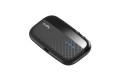
MikroTik Woobm-USB Wireless Out-of-Band Management USB Stick
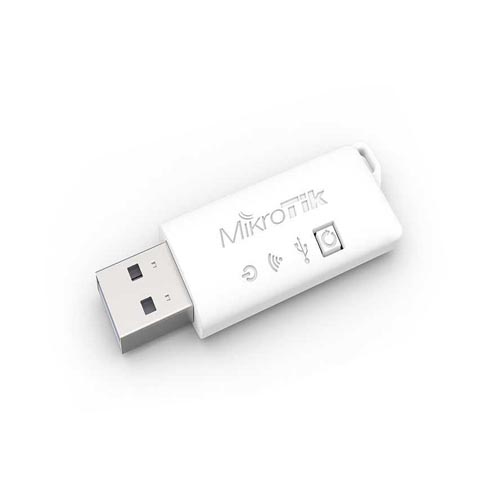
The MikroTik Woobm-USB is a wireless out-of-band management USB stick designed to provide wireless console access to compatible MikroTik RouterBOARD devices that have a USB port but do not have built-in wireless connectivity. It works as a Wi-Fi-to-serial bridge, allowing network administrators to access and manage a router's console wirelessly. MikroTik currently lists the Woobm-USB as a discontinued product.
Wireless Out-of-Band Management
The Woobm-USB is designed primarily for network administration and remote console management. Once connected to a compatible RouterBOARD USB port, it creates a wireless management interface that can be accessed from a computer, smartphone or other Wi-Fi-enabled device.
This is particularly useful when administrators need console-level access without connecting a physical serial cable directly to the router.
Wi-Fi to Serial Bridge
The core function of the Woobm-USB is to bridge a RouterBOARD's USB serial interface to a wireless connection. MikroTik describes the device as a WiFi-to-serial bridge for RouterBOARD equipment with USB connectivity but without integrated wireless interfaces.
2.4GHz 802.11b/g/n Wireless
The Woobm-USB operates on the 2.4GHz wireless band and supports 802.11b/g/n standards. It can operate either as a wireless access point or as a wireless client, providing flexibility for different network-management environments.
Wireless Access Point Mode
When first connected, the Woobm-USB can create a wireless network with the default SSID WoobmAP. The default device IP address is 192.168.4.1, allowing an administrator to connect to its web interface and configure the device.
Wireless Client Mode
The Woobm-USB can also operate as a wireless client. This allows multiple Woobm devices to connect to a common access point, which can be useful for managing multiple RouterBOARD devices from a centralized wireless network.
Web-Based Management Interface
The built-in web interface provides access to the Woobm-USB configuration and management functions. Administrators can use the interface to access the connected RouterBOARD's terminal and configure the Woobm itself.
Wireless RouterOS Console Access
After connecting the Woobm-USB to a compatible RouterBOARD, the device can provide access to the router's serial console through its web-based Terminal interface. This enables administrators to enter commands and perform console-level configuration without directly connecting a physical console cable.
Telnet Access
The Woobm-USB also supports Telnet access to the serial port. A Telnet client can connect to the Woobm-USB's IP address, and the device forwards the serial connection to the connected RouterBOARD.
RouterBOARD Neighbor Discovery
The Woobm-USB can discover neighboring MikroTik RouterOS devices on the network. From the web interface, administrators can select a discovered device and establish a connection where supported. This can simplify management in environments containing multiple MikroTik devices.
USB Powered Operation
The Woobm-USB receives power directly from the USB port of the connected RouterBOARD. This eliminates the need for a separate power adapter for the management stick.
Serial Communication
The default serial communication settings include a 115200 baud rate, 8 data bits, no parity and 1 stop bit. These settings can be configured through the device's management interface and should match the connected host device.
WPA and WPA2 Wireless Security
Wireless access-point and station configurations support WPA-PSK and WPA2-PSK security options according to MikroTik's documentation. This allows the wireless management connection to be protected rather than operating as an unrestricted wireless interface.
Compact USB Design
The Woobm-USB uses a compact USB-stick form factor designed to plug directly into the USB port of a compatible RouterBOARD. MikroTik's published product information lists dimensions of approximately 55 × 19 × 8 mm.
Technical Specifications
| Brand | MikroTik |
| Model | Woobm-USB |
| Product Type | Wireless Out-of-Band Management USB Stick |
| Primary Function | Wi-Fi-to-Serial Bridge |
| Wireless Frequency | 2.4GHz |
| Wireless Standards | 802.11b/g/n |
| Wireless Modes | Access Point / Client |
| USB Type | USB Type-A |
| Power Input | 5V via USB |
| Antenna Gain | 1.5 dBi |
| Dimensions | 55 × 19 × 8 mm |
| Default AP SSID | WoobmAP |
| Default IP Address | 192.168.4.1 |
| Default Serial Speed | 115200 baud |
| Status | Discontinued |
The above specifications are based on MikroTik's official product information, documentation and published Woobm-USB documentation.
Applications of MikroTik Woobm-USB
- Wireless RouterBOARD console management
- Out-of-band network management
- Remote router administration
- Server-room network management
- Data-center equipment management
- ISP network administration
- MikroTik RouterOS console access
- Network troubleshooting
- Router configuration and maintenance
- Network laboratory environments
- Multi-router management
- Emergency console access
Ideal for Network Administrators
The Woobm-USB is especially useful for network administrators who need an alternative method of accessing a MikroTik router's console. Because the management connection is wireless, an administrator can access the console without being physically connected to the router through a conventional serial cable.
Useful for Server Rooms and Data Centers
In server rooms and data centers, routers and network equipment may be installed inside racks where physical console access can be inconvenient. A Woobm-USB can provide a wireless management path to a compatible RouterBOARD, making certain configuration and troubleshooting tasks easier.
Important Compatibility Note
The Woobm-USB is not a general-purpose USB Wi-Fi adapter. It is a dedicated management device designed to work with compatible MikroTik RouterBOARD equipment through its USB port. MikroTik documentation specifically describes it as a device for RouterBOARD equipment with USB connectivity.
Why Choose MikroTik Woobm-USB?
The MikroTik Woobm-USB provides a specialized solution for wireless out-of-band console management. Its combination of 2.4GHz 802.11b/g/n wireless connectivity, USB-powered operation, web-based terminal access and Telnet support makes it a useful tool for network administrators working with compatible MikroTik RouterBOARD devices.
It is particularly valuable in environments where direct physical console access is inconvenient and a dedicated wireless management path can simplify administration and troubleshooting.
Frequently Asked Questions
What is MikroTik Woobm-USB?
MikroTik Woobm-USB is a wireless out-of-band management USB stick that works as a Wi-Fi-to-serial bridge for compatible RouterBOARD devices.
What is the main purpose of Woobm-USB?
Its primary purpose is to provide wireless access to the console of a compatible MikroTik RouterBOARD device.
Does Woobm-USB support 2.4GHz Wi-Fi?
Yes. It operates at 2.4GHz and supports 802.11b/g/n wireless standards.
Can Woobm-USB work as an access point?
Yes. The device can operate in access-point mode and initially creates the WoobmAP wireless network.
Can Woobm-USB work as a wireless client?
Yes. It supports wireless client mode, allowing multiple Woobm devices to connect to a common access point.
How is the Woobm-USB powered?
The device receives power from the USB port of the connected RouterBOARD.
What is the default IP address?
The default Woobm-USB IP address is 192.168.4.1.
What is the default Wi-Fi SSID?
The initial access-point SSID is WoobmAP.
Does Woobm-USB support Telnet?
Yes. Telnet can be used to access the Woobm-USB serial bridge.
Is MikroTik Woobm-USB still manufactured?
MikroTik currently lists the Woobm-USB as discontinued. Availability may therefore depend on remaining stock from distributors or resellers.